> ## Documentation Index
> Fetch the complete documentation index at: https://docs.solvice.io/llms.txt
> Use this file to discover all available pages before exploring further.
# Authentication
> Secure API access with API keys for all Solvice optimization services
## Overview
The Solvice Platform uses API key authentication to secure access to all optimization endpoints. Every request to our solvers requires a valid API key included in the request headers.
All API communications are encrypted using HTTPS to ensure your data and credentials remain secure during transmission.
## Getting Your API Key
Create your account at [platform.solvice.io](https://platform.solvice.io) if you haven't already.
New accounts receive a 14-day free trial with full access to all solver capabilities.
Once logged in, go to **Settings** → **API Keys** in your dashboard.
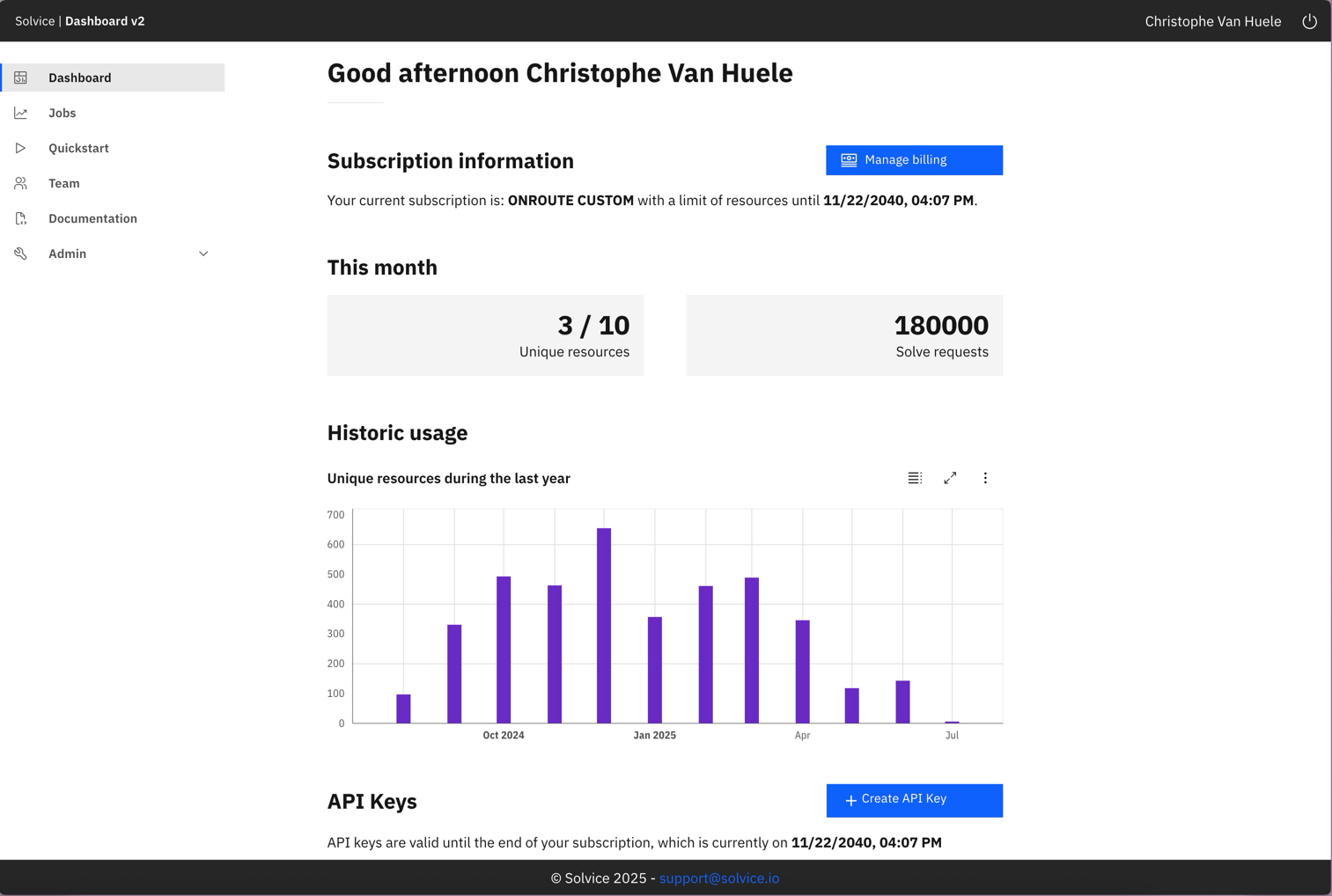 Click **Create API Key** and provide a descriptive name for your key (e.g., "Production VRP Integration").
Store your API key securely. For security reasons, you won't be able to view the full key again after creation.
Select which solvers and operations this key can access:
* **Solver access**: VRP, FILL, CREATE, TASK, CLUST
* **Operations**: Solve, Evaluate, Suggest, Status, Solution, Explanation
Follow the principle of least privilege - only grant permissions required for your specific use case.
## Using Your API Key
Include your API key in the `Authorization` header of every request to Solvice APIs.
### Authentication Header Format
```
Authorization: YOUR_API_KEY
```
The API key should be sent directly in the Authorization header without any prefix like "Bearer" or "Basic".
### Request Examples
```bash cURL theme={null}
curl -X POST 'https://api.solvice.io/v2/vrp/solve' \
-H 'Authorization: YOUR_API_KEY' \
-H 'Content-Type: application/json' \
-d '{
"vehicles": [...],
"jobs": [...],
"objectives": [...]
}'
```
```javascript Node.js theme={null}
const response = await fetch('https://api.solvice.io/v2/vrp/solve', {
method: 'POST',
headers: {
'Authorization': process.env.SOLVICE_API_KEY,
'Content-Type': 'application/json'
},
body: JSON.stringify(requestData)
});
if (!response.ok) {
throw new Error(`API request failed: ${response.status}`);
}
const result = await response.json();
```
```python Python theme={null}
import os
import requests
api_key = os.environ.get('SOLVICE_API_KEY')
response = requests.post(
'https://api.solvice.io/v2/vrp/solve',
headers={
'Authorization': api_key,
'Content-Type': 'application/json'
},
json=request_data
)
if response.status_code != 200:
raise Exception(f'API request failed: {response.status_code}')
result = response.json()
```
```java Java theme={null}
import java.net.http.HttpClient;
import java.net.http.HttpRequest;
import java.net.http.HttpResponse;
HttpClient client = HttpClient.newHttpClient();
HttpRequest request = HttpRequest.newBuilder()
.uri(URI.create("https://api.solvice.io/v2/vrp/solve"))
.header("Authorization", System.getenv("SOLVICE_API_KEY"))
.header("Content-Type", "application/json")
.POST(HttpRequest.BodyPublishers.ofString(requestJson))
.build();
HttpResponse response = client.send(request,
HttpResponse.BodyHandlers.ofString());
```
```csharp C# theme={null}
using var client = new HttpClient();
client.DefaultRequestHeaders.Add("Authorization",
Environment.GetEnvironmentVariable("SOLVICE_API_KEY"));
var response = await client.PostAsJsonAsync(
"https://api.solvice.io/v2/vrp/solve",
requestData
);
response.EnsureSuccessStatusCode();
var result = await response.Content.ReadFromJsonAsync();
```
## Authentication Errors
When authentication fails, the API returns specific error codes to help diagnose the issue:
```json 401 Unauthorized theme={null}
{
"error": {
"code": "UNAUTHORIZED",
"message": "Invalid or missing API key",
"details": "Please check your Authorization header"
}
}
```
### Common Authentication Issues
**Problem**: No API key provided in the request
**Solution**: Ensure the `Authorization` header is included in your request
```bash theme={null}
# ❌ Missing Authorization header
curl -X POST 'https://api.solvice.io/v2/vrp/solve'
# ✅ Correct
curl -X POST 'https://api.solvice.io/v2/vrp/solve' \
-H 'Authorization: YOUR_API_KEY'
```
**Problem**: The provided API key is invalid or has been revoked
**Solution**:
* Verify you're using the correct API key
* Check if the key has been accidentally truncated
* Ensure the key hasn't been revoked in your dashboard
**Problem**: Your API key doesn't have permission for the requested operation
**Solution**: Check your key's permissions in the dashboard and ensure it has access to:
* The specific solver (VRP, FILL, etc.)
* The operation type (solve, evaluate, suggest)
**Problem**: You've exceeded your rate limit
**Solution**:
* Implement exponential backoff in your retry logic
* Check your current rate limits in the dashboard
* Consider upgrading your plan for higher limits
## Security Best Practices
Never hardcode API keys in your source code. Use environment variables instead:
```bash .env theme={null}
SOLVICE_API_KEY=your_api_key_here
```
Add `.env` files to your `.gitignore` to prevent accidental commits
Regularly rotate your API keys, especially for production environments:
* Set up a rotation schedule (e.g., every 90 days)
* Update keys during maintenance windows
* Keep the previous key active briefly during transition
Use different API keys for different environments:
```javascript theme={null}
const apiKey = process.env.NODE_ENV === 'production'
? process.env.SOLVICE_PROD_KEY
: process.env.SOLVICE_DEV_KEY;
```
Regularly review your API key usage in the dashboard:
* Check for unexpected usage patterns
* Monitor which endpoints are being called
* Set up alerts for unusual activity
Apply the principle of least privilege:
* Development keys: Limited to non-production solvers
* Production keys: Only required solvers and operations
* CI/CD keys: Read-only access for testing
## Server-Side Proxy Pattern
For web applications, implement a server-side proxy to keep your API keys secure:
```javascript server.js theme={null}
const express = require('express');
const app = express();
// Never expose API keys to client-side code
const SOLVICE_API_KEY = process.env.SOLVICE_API_KEY;
app.post('/api/solve', async (req, res) => {
try {
const response = await fetch('https://api.solvice.io/v2/vrp/solve', {
method: 'POST',
headers: {
'Authorization': SOLVICE_API_KEY,
'Content-Type': 'application/json'
},
body: JSON.stringify(req.body)
});
const data = await response.json();
res.json(data);
} catch (error) {
res.status(500).json({ error: 'Internal server error' });
}
});
```
```python app.py theme={null}
from flask import Flask, request, jsonify
import requests
import os
app = Flask(__name__)
SOLVICE_API_KEY = os.environ.get('SOLVICE_API_KEY')
@app.route('/api/solve', methods=['POST'])
def solve():
try:
response = requests.post(
'https://api.solvice.io/v2/vrp/solve',
headers={
'Authorization': SOLVICE_API_KEY,
'Content-Type': 'application/json'
},
json=request.json
)
return jsonify(response.json()), response.status_code
except Exception as e:
return jsonify({'error': 'Internal server error'}), 500
```
```javascript frontend.js theme={null}
// Client makes requests to your server, not directly to Solvice
const response = await fetch('/api/solve', {
method: 'POST',
headers: {
'Content-Type': 'application/json'
},
body: JSON.stringify(optimizationRequest)
});
// No API key needed on client side
const result = await response.json();
```
## Rate Limiting
Solvice implements rate limiting to ensure fair usage and platform stability:
Every API response includes rate limit information:
```
X-RateLimit-Limit: 100
X-RateLimit-Remaining: 95
X-RateLimit-Reset: 1609459200
```
Maximum requests allowed in the current window
Number of requests remaining in the current window
Unix timestamp when the rate limit window resets
```javascript theme={null}
async function makeRequestWithRetry(url, options, maxRetries = 3) {
for (let i = 0; i < maxRetries; i++) {
const response = await fetch(url, options);
if (response.status === 429) {
const resetTime = response.headers.get('X-RateLimit-Reset');
const waitTime = resetTime
? (parseInt(resetTime) * 1000) - Date.now()
: Math.pow(2, i) * 1000; // Exponential backoff
console.log(`Rate limited. Waiting ${waitTime}ms...`);
await new Promise(resolve => setTimeout(resolve, waitTime));
continue;
}
return response;
}
throw new Error('Max retries exceeded');
}
```
## SDK Authentication
Our official SDKs handle authentication details for you:
```typescript theme={null}
import { SolviceClient } from '@solvice/sdk';
const client = new SolviceClient({
apiKey: process.env.SOLVICE_API_KEY,
// SDK handles all authentication headers
});
const result = await client.vrp.solve({
vehicles: [...],
jobs: [...]
});
```
```python theme={null}
from solvice import SolviceClient
client = SolviceClient(
api_key=os.environ.get('SOLVICE_API_KEY')
)
result = client.vrp.solve(
vehicles=[...],
jobs=[...]
)
```
```java theme={null}
SolviceClient client = SolviceClient.builder()
.apiKey(System.getenv("SOLVICE_API_KEY"))
.build();
SolveResponse result = client.vrp().solve(
SolveRequest.builder()
.vehicles(vehicles)
.jobs(jobs)
.build()
);
```
## Testing Authentication
Use our test endpoint to verify your API key is working correctly:
```bash cURL theme={null}
curl 'https://api.solvice.io/v2/auth/verify' \
-H 'Authorization: YOUR_API_KEY'
```
```javascript Response theme={null}
{
"valid": true,
"key_name": "Production VRP Integration",
"permissions": {
"solvers": ["vrp", "fill"],
"operations": ["solve", "status", "solution"]
},
"rate_limit": {
"requests_per_hour": 1000,
"concurrent_jobs": 10
}
}
```
## Next Steps
Start optimizing routes with your API key
Explore all available endpoints
Use our official SDK libraries
Manage your API keys and usage
Click **Create API Key** and provide a descriptive name for your key (e.g., "Production VRP Integration").
Store your API key securely. For security reasons, you won't be able to view the full key again after creation.
Select which solvers and operations this key can access:
* **Solver access**: VRP, FILL, CREATE, TASK, CLUST
* **Operations**: Solve, Evaluate, Suggest, Status, Solution, Explanation
Follow the principle of least privilege - only grant permissions required for your specific use case.
## Using Your API Key
Include your API key in the `Authorization` header of every request to Solvice APIs.
### Authentication Header Format
```
Authorization: YOUR_API_KEY
```
The API key should be sent directly in the Authorization header without any prefix like "Bearer" or "Basic".
### Request Examples
```bash cURL theme={null}
curl -X POST 'https://api.solvice.io/v2/vrp/solve' \
-H 'Authorization: YOUR_API_KEY' \
-H 'Content-Type: application/json' \
-d '{
"vehicles": [...],
"jobs": [...],
"objectives": [...]
}'
```
```javascript Node.js theme={null}
const response = await fetch('https://api.solvice.io/v2/vrp/solve', {
method: 'POST',
headers: {
'Authorization': process.env.SOLVICE_API_KEY,
'Content-Type': 'application/json'
},
body: JSON.stringify(requestData)
});
if (!response.ok) {
throw new Error(`API request failed: ${response.status}`);
}
const result = await response.json();
```
```python Python theme={null}
import os
import requests
api_key = os.environ.get('SOLVICE_API_KEY')
response = requests.post(
'https://api.solvice.io/v2/vrp/solve',
headers={
'Authorization': api_key,
'Content-Type': 'application/json'
},
json=request_data
)
if response.status_code != 200:
raise Exception(f'API request failed: {response.status_code}')
result = response.json()
```
```java Java theme={null}
import java.net.http.HttpClient;
import java.net.http.HttpRequest;
import java.net.http.HttpResponse;
HttpClient client = HttpClient.newHttpClient();
HttpRequest request = HttpRequest.newBuilder()
.uri(URI.create("https://api.solvice.io/v2/vrp/solve"))
.header("Authorization", System.getenv("SOLVICE_API_KEY"))
.header("Content-Type", "application/json")
.POST(HttpRequest.BodyPublishers.ofString(requestJson))
.build();
HttpResponse response = client.send(request,
HttpResponse.BodyHandlers.ofString());
```
```csharp C# theme={null}
using var client = new HttpClient();
client.DefaultRequestHeaders.Add("Authorization",
Environment.GetEnvironmentVariable("SOLVICE_API_KEY"));
var response = await client.PostAsJsonAsync(
"https://api.solvice.io/v2/vrp/solve",
requestData
);
response.EnsureSuccessStatusCode();
var result = await response.Content.ReadFromJsonAsync();
```
## Authentication Errors
When authentication fails, the API returns specific error codes to help diagnose the issue:
```json 401 Unauthorized theme={null}
{
"error": {
"code": "UNAUTHORIZED",
"message": "Invalid or missing API key",
"details": "Please check your Authorization header"
}
}
```
### Common Authentication Issues
**Problem**: No API key provided in the request
**Solution**: Ensure the `Authorization` header is included in your request
```bash theme={null}
# ❌ Missing Authorization header
curl -X POST 'https://api.solvice.io/v2/vrp/solve'
# ✅ Correct
curl -X POST 'https://api.solvice.io/v2/vrp/solve' \
-H 'Authorization: YOUR_API_KEY'
```
**Problem**: The provided API key is invalid or has been revoked
**Solution**:
* Verify you're using the correct API key
* Check if the key has been accidentally truncated
* Ensure the key hasn't been revoked in your dashboard
**Problem**: Your API key doesn't have permission for the requested operation
**Solution**: Check your key's permissions in the dashboard and ensure it has access to:
* The specific solver (VRP, FILL, etc.)
* The operation type (solve, evaluate, suggest)
**Problem**: You've exceeded your rate limit
**Solution**:
* Implement exponential backoff in your retry logic
* Check your current rate limits in the dashboard
* Consider upgrading your plan for higher limits
## Security Best Practices
Never hardcode API keys in your source code. Use environment variables instead:
```bash .env theme={null}
SOLVICE_API_KEY=your_api_key_here
```
Add `.env` files to your `.gitignore` to prevent accidental commits
Regularly rotate your API keys, especially for production environments:
* Set up a rotation schedule (e.g., every 90 days)
* Update keys during maintenance windows
* Keep the previous key active briefly during transition
Use different API keys for different environments:
```javascript theme={null}
const apiKey = process.env.NODE_ENV === 'production'
? process.env.SOLVICE_PROD_KEY
: process.env.SOLVICE_DEV_KEY;
```
Regularly review your API key usage in the dashboard:
* Check for unexpected usage patterns
* Monitor which endpoints are being called
* Set up alerts for unusual activity
Apply the principle of least privilege:
* Development keys: Limited to non-production solvers
* Production keys: Only required solvers and operations
* CI/CD keys: Read-only access for testing
## Server-Side Proxy Pattern
For web applications, implement a server-side proxy to keep your API keys secure:
```javascript server.js theme={null}
const express = require('express');
const app = express();
// Never expose API keys to client-side code
const SOLVICE_API_KEY = process.env.SOLVICE_API_KEY;
app.post('/api/solve', async (req, res) => {
try {
const response = await fetch('https://api.solvice.io/v2/vrp/solve', {
method: 'POST',
headers: {
'Authorization': SOLVICE_API_KEY,
'Content-Type': 'application/json'
},
body: JSON.stringify(req.body)
});
const data = await response.json();
res.json(data);
} catch (error) {
res.status(500).json({ error: 'Internal server error' });
}
});
```
```python app.py theme={null}
from flask import Flask, request, jsonify
import requests
import os
app = Flask(__name__)
SOLVICE_API_KEY = os.environ.get('SOLVICE_API_KEY')
@app.route('/api/solve', methods=['POST'])
def solve():
try:
response = requests.post(
'https://api.solvice.io/v2/vrp/solve',
headers={
'Authorization': SOLVICE_API_KEY,
'Content-Type': 'application/json'
},
json=request.json
)
return jsonify(response.json()), response.status_code
except Exception as e:
return jsonify({'error': 'Internal server error'}), 500
```
```javascript frontend.js theme={null}
// Client makes requests to your server, not directly to Solvice
const response = await fetch('/api/solve', {
method: 'POST',
headers: {
'Content-Type': 'application/json'
},
body: JSON.stringify(optimizationRequest)
});
// No API key needed on client side
const result = await response.json();
```
## Rate Limiting
Solvice implements rate limiting to ensure fair usage and platform stability:
Every API response includes rate limit information:
```
X-RateLimit-Limit: 100
X-RateLimit-Remaining: 95
X-RateLimit-Reset: 1609459200
```
Maximum requests allowed in the current window
Number of requests remaining in the current window
Unix timestamp when the rate limit window resets
```javascript theme={null}
async function makeRequestWithRetry(url, options, maxRetries = 3) {
for (let i = 0; i < maxRetries; i++) {
const response = await fetch(url, options);
if (response.status === 429) {
const resetTime = response.headers.get('X-RateLimit-Reset');
const waitTime = resetTime
? (parseInt(resetTime) * 1000) - Date.now()
: Math.pow(2, i) * 1000; // Exponential backoff
console.log(`Rate limited. Waiting ${waitTime}ms...`);
await new Promise(resolve => setTimeout(resolve, waitTime));
continue;
}
return response;
}
throw new Error('Max retries exceeded');
}
```
## SDK Authentication
Our official SDKs handle authentication details for you:
```typescript theme={null}
import { SolviceClient } from '@solvice/sdk';
const client = new SolviceClient({
apiKey: process.env.SOLVICE_API_KEY,
// SDK handles all authentication headers
});
const result = await client.vrp.solve({
vehicles: [...],
jobs: [...]
});
```
```python theme={null}
from solvice import SolviceClient
client = SolviceClient(
api_key=os.environ.get('SOLVICE_API_KEY')
)
result = client.vrp.solve(
vehicles=[...],
jobs=[...]
)
```
```java theme={null}
SolviceClient client = SolviceClient.builder()
.apiKey(System.getenv("SOLVICE_API_KEY"))
.build();
SolveResponse result = client.vrp().solve(
SolveRequest.builder()
.vehicles(vehicles)
.jobs(jobs)
.build()
);
```
## Testing Authentication
Use our test endpoint to verify your API key is working correctly:
```bash cURL theme={null}
curl 'https://api.solvice.io/v2/auth/verify' \
-H 'Authorization: YOUR_API_KEY'
```
```javascript Response theme={null}
{
"valid": true,
"key_name": "Production VRP Integration",
"permissions": {
"solvers": ["vrp", "fill"],
"operations": ["solve", "status", "solution"]
},
"rate_limit": {
"requests_per_hour": 1000,
"concurrent_jobs": 10
}
}
```
## Next Steps
Start optimizing routes with your API key
Explore all available endpoints
Use our official SDK libraries
Manage your API keys and usage